


GPS Voice Route - GPS Camera
4.15.00 Reviews
App Specs
- Version
- 1.0.29
- Updated On
- License
- Free
- Downloads
- 100,000+
- Developer
- App Aviator_GPS Maps & Navigation
- Categories
- Maps & Navigation
- Platform
- Android
Screenshots
 Analysis by AppCompare
I’d treat GPS Voice Route - GPS Camera as a practical navigation option for a household that sometimes shares a phone or takes trips together. Its combination of spoken directions and route photography may suit different outings, but it works best when the person holding the phone stays in charge of the route and the camera. I would not assume that a shared device automatically means shared settings, saved places, or privacy boundaries.
One phone, different journeys
Picture a family using one phone for a weekend drive: one adult navigates, while another takes a turn behind the wheel later. Voice directions can make that handoff less fiddly than asking the driver to keep checking a map, and the camera can capture stops along the way. The useful part is having these tasks in one app; the trade-off is that the phone becomes a shared travel tool, so it is worth agreeing who handles it and when.
For a simple outing, I’d set the destination before pulling away, check that the route is the one everyone expects, then leave the phone somewhere visible to the passenger rather than treating it as something to operate while driving. If the driver changes, I’d pause somewhere safe before handing over the device or changing the destination. That small routine matters more than any clever navigation feature: it reduces distraction and avoids confusion about which person is responsible for directions.
What sharing a device does—and does not—solve
Shared use is different from a family account. I would not count on separate profiles, child-specific settings, or a way to keep one person’s saved places apart from another’s unless the app itself clearly offers those options. If several people use the same phone, treat any saved destinations and captured images as belonging to the device’s shared environment, and review them together when needed.
That is especially relevant when a route includes home, school, work, or a regular pickup point. A photo marked with location details can be convenient for remembering where a stop happened, but it can also reveal more than the image alone. Before sharing a travel picture publicly, I’d check what location information accompanies it and consider whether the destination is something the household wants to disclose.
Everyday navigation with a camera in the mix
In practical terms, GPS Voice Route - GPS Camera is a free Maps & Navigation app from App Aviator_GPS Maps & Navigation. It has a 4.1 average from around 60 ratings and has passed 100,000 installs. Those figures suggest that people are trying it, though they don’t tell me how it will behave on every phone or in every location. The app is listed for Everyone, runs on Android 7.0 or later, and its current release is version 1.0.29. Optional in-app purchases range from $2.49 to $59.99 per item, so I’d check the purchase screen carefully if I were considering anything beyond the free use.
Its appeal is the pairing of voice-led route finding with a camera for documenting places. That makes more sense for people who want a simple travel companion than for drivers looking for a highly configurable professional navigation system. I’d also separate the two jobs in my mind: navigation helps me get somewhere, while location-tagged photos help me remember where I stopped. The camera element is a bonus, not a reason to take pictures while moving.
Worth Reading Before You Choose

EA SPORTS FC Mobile 26 Is a Bigger Football Game, but It Takes Time

Flipboard Shows What News Apps Must Do Beyond the Feed

Switching to Android Auto Means Rethinking Your Driving Routine

Google Calendar Makes a Crowded Week Easier to Manage

Ludo King Makes the Most of the Minutes Between Plans

Baby Panda World Brings Quick Play to Modern Phones, but Its Game Library Feels Busy
Getting ready before the car moves
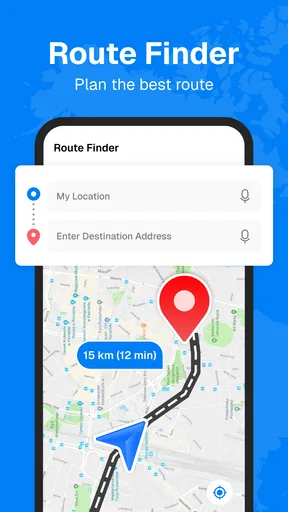
First off, the navigation feature is top-notch. You get real-time, voice-guided directions that make it feel like you have a co-pilot riding shotgun. No more squinting at your screen trying to decipher map routes while driving. Just listen and drive! The app is smart enough to reroute you if you miss a turn, which, let’s be honest, happens more often than we’d like to admit.
The voice guidance is clear and precise, making it super easy to follow along without any hassle. You can even choose from different voice options, which is a fun touch if you want to mix things up a bit.
For a new destination, I’d enter the address while parked and take a moment to check the route before starting. Voice prompts are most useful when the driver can listen rather than glance down, but I’d still ask a passenger to verify an unexpected turn or a destination that looks wrong. A route can be recalculated after a missed turn, yet that does not remove the need to make safe decisions in confusing junctions or unfamiliar streets.
One practical tip is to keep the volume and voice choice consistent before a trip. Switching voices just for novelty may be fun at home, but a familiar prompt is easier to recognize when the cabin is noisy or conversation is underway. If the spoken guidance is hard to hear, I’d stop safely and adjust it rather than increasing interaction while driving. For a passenger navigating, the same setup makes it easier to relay directions without turning the journey into a running debate over the screen.
Using the camera without making the trip harder
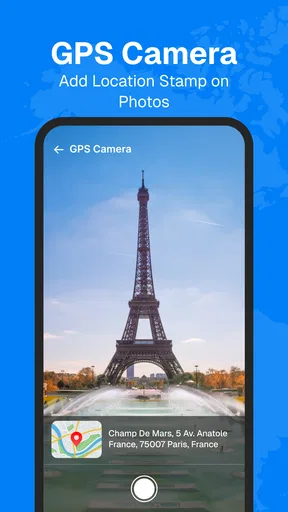
Now, here’s where it gets even more interesting. The GPS Camera feature lets you take photos along your route. Each photo is automatically tagged with the location details, so you can create a visual diary of your travels. Whether you're road-tripping across the country or just exploring your local neighborhood, capturing these moments adds a personal touch to your journey.
You can easily share these photos with friends or post them on social media. It’s like saying, “Hey, look where I am!” without the need for long descriptive texts.
I’d use that feature when the vehicle is stopped: at a scenic viewpoint, a café, or a landmark that the group wants to remember. That makes the location tag useful later, when a photo’s setting is not obvious, without creating pressure to photograph every stop. For a household, it can also make a modest shared album easier to understand: the picture has context, so people do not need to guess which park or town it came from.
The trade-off is that location information changes the privacy character of a photo. A picture of a meal or a view may also identify where someone was at a particular time. I’d be selective about posting images from routine places, especially if children or other family members are visible, and I’d share only with the audience I actually intend. The app’s camera is best treated as a travel notebook, not an automatic invitation to broadcast a household’s movements.
Ease of use and saved destinations
The app’s interface is incredibly user-friendly. Even if technology isn’t your thing, you’ll find this app easy to navigate. The setup is straightforward, and I was up and running within minutes. The design is sleek, with intuitive controls that make it simple to toggle between navigation and camera modes.
Another cool feature is the app’s ability to save your frequently visited places. So, if you often find yourself heading to the same spots, you can save them for quick access later. It’s all about making your life easier!
Saved places are particularly handy for recurring errands, but on a shared phone they can become ambiguous: a saved label may make perfect sense to one person and mean little to everyone else. I’d use clear names such as “library” or “sports practice” rather than a private nickname, and avoid saving sensitive destinations casually. Before relying on a saved place for an important pickup, I’d confirm the pin or address instead of assuming the label guarantees the correct entrance.
That is a small but useful distinction between convenience and certainty. A shortcut helps with a familiar destination; it does not replace checking the exact drop-off point when a venue has several entrances or a large parking area. In a shared-device household, clear labels and a quick confirmation can prevent the next user from being sent to the wrong side of a building.
Who will find it useful—and who may prefer another map
Whether you’re an adventurer at heart or just need a reliable navigation tool for daily commutes, this app has got you covered. The real-time traffic updates ensure you’re always on the best route, avoiding any unexpected delays.
For those who love to explore, the photo feature adds another layer of enjoyment to your trips. You get to document your journey in a way that’s both fun and useful.
I can see it working well for occasional drivers, visitors exploring an unfamiliar neighborhood, and households that want voice directions without juggling a separate photo app during a trip. It may also suit someone who likes keeping a visual record of outings. A commuter who only needs turn-by-turn guidance may find the camera less important, while a frequent traveler who depends on detailed route controls should compare it with the navigation apps they already trust before switching.
Compared with a basic map app, the distinctive idea here is joining spoken route guidance and location-tagged travel photos. Compared with a dedicated camera workflow, the location context is more immediate, but it does not make the app a full photo-organizing system. And compared with established navigation tools, the deciding question is not simply whether it can guide a route; it is whether its interface, route choices, and behavior suit your own daily journeys. I’d try it on a familiar trip first, rather than making it my only guide for an important appointment.
It is also worth remembering that voice directions are a convenience, not a guarantee against delays or mistakes. Traffic and road conditions can change, and a driver still needs to follow signs and use judgment. If you are traveling somewhere with unreliable connectivity or need dependable offline navigation, choose a tool that explicitly meets that requirement. I would not assume that every feature works without a connection simply because the app uses GPS.
Age, trust, and sensible boundaries
The Everyone content rating means the app is presented for a broad audience, but that is not the same as saying every household should hand it to a child without guidance. Navigation can involve a home address, regular destinations, and images tied to places. I’d show younger users how to start a route safely, explain why they should not post location-tagged pictures thoughtlessly, and keep driving decisions with the adult behind the wheel.
There is a practical distinction between letting a child take a photo at a family stop and letting them publish it with location context. The first can be a harmless way to remember a day; the second deserves an adult check. I’d also avoid treating a phone’s saved places as a private family directory. If several people can open the device, anyone with access may see information another person considered personal.
The app is free to install, but it offers in-app purchases, so I’d keep purchase decisions with the account holder and review any prompt before confirming it. That is especially sensible on a shared device, where a child or guest might not know whether a button starts a paid item. The age rating is a useful starting point, not a substitute for ordinary supervision and clear household rules.
My household verdict
All in all, GPS Voice Route - GPS Camera is a fantastic app that combines navigation and photography in a unique way. It’s easy to use, reliable, and adds a personal touch to your travels. Whether you're hitting the road for a long trip or just heading to a new restaurant in town, this app makes the journey enjoyable.
So, why not give it a shot? Download it from your app store, and take it for a spin. Trust me, you’ll wonder how you ever traveled without it!
My more measured recommendation is to test it first on a short, familiar drive, then decide whether the spoken directions and camera fit your routine. It seems best for people who value straightforward route guidance and enjoy recording stops, especially when a passenger can manage the phone. I’d choose another option if my priority were advanced navigation controls, a carefully separated family setup, or a known offline workflow. For shared household use, agree who handles the screen, keep saved places understandable, and think before sharing location-tagged photos. With those boundaries, it can be a useful travel companion rather than another source of distraction.
Pros
- Voice navigation enhances hands-free driving.
- Integrated camera captures route details easily.
- User-friendly interface simplifies route planning.
- Offline maps available for areas with poor signal.
- Customizable settings for a personalized experience.
Cons
- Occasional GPS signal loss in remote areas.
- Voice guidance lags on some older devices.
- Camera features consume significant battery life.
- Limited support for international languages.
- In-app ads can be intrusive during navigation.
FAQs for GPS Voice Route - GPS Camera
What is GPS Voice Route - GPS Camera, and how does it work?
GPS Voice Route - GPS Camera is an app designed to enhance navigation by providing voice-guided directions combined with a camera feature for documenting your journey. It uses your device's GPS to track your location and offers spoken instructions, ensuring hands-free navigation. The camera function allows users to capture images with GPS tags, making it ideal for travel documentation.
How accurate is the GPS functionality in GPS Voice Route - GPS Camera?
The app relies on your device’s built-in GPS to offer real-time navigation with a high degree of accuracy. However, its precision can vary based on satellite availability, network connection, and environmental factors such as tall buildings or dense forests. Users typically find it reliable for urban and rural navigation alike.
Can I use GPS Voice Route - GPS Camera offline?
Yes, GPS Voice Route - GPS Camera supports offline maps. Users can download maps for specific areas ahead of time, which allows for navigation without an active internet connection. This feature is particularly useful when traveling in areas with limited network coverage or roaming restrictions.
What are the key features of the camera function in GPS Voice Route - GPS Camera?
The camera feature allows users to capture high-quality images with embedded GPS tags, recording the location and time of each photo. This is useful for travelers wanting to document their journeys or for professionals needing to log locations. The app supports various image formats and provides easy sharing options.
Is GPS Voice Route - GPS Camera compatible with all Android and iOS devices?
The app is designed to work on most modern Android and iOS devices. However, it requires certain minimum OS versions (usually Android 5.0 or iOS 11 and above) and specific hardware capabilities like GPS and a camera. Users should check their device compatibility in the app store before downloading.


